
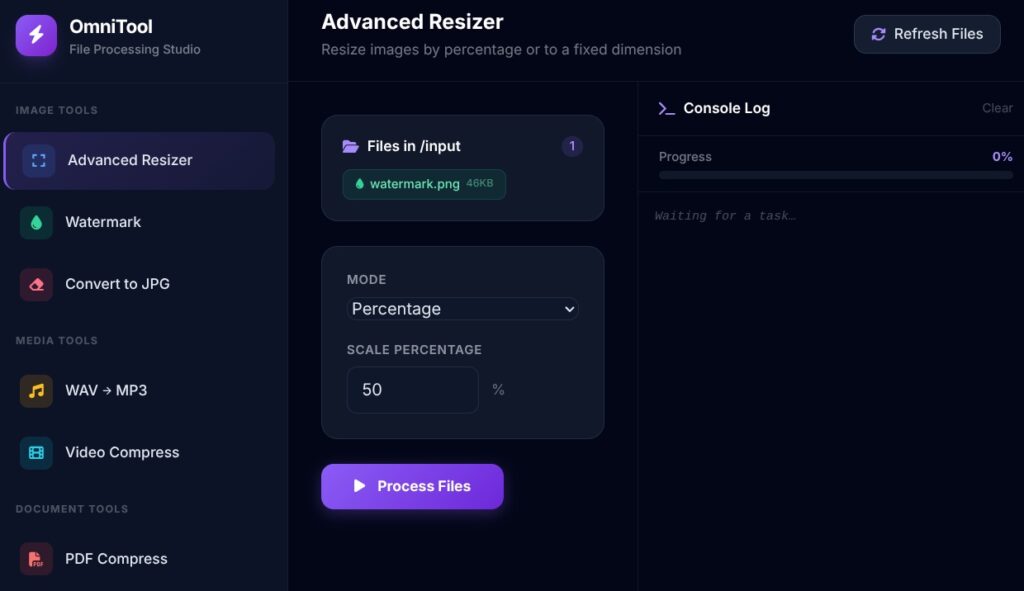
After months of tinkering, testing, and caffeine-fueled nights, I’m thrilled to announce the first official stable release of OmniTool – a completely free, open-source, local-first powerhouse designed to make bulk multimedia processing dead simple.Whether you’re a photographer cleaning up thousands of photos, a content creator batch-converting assets, a privacy-conscious user stripping metadata before sharing files, or just someone tired of clunky online tools — OmniTool brings a clean, no-nonsense “workshop” right to your desktop. Why OmniTool Stands Out
- 100% Local & Private — Everything runs on your machine. No uploads, no cloud nonsense, no tracking.
- FOSS Forever — Licensed under a permissive open-source license (check the repo for exact terms).
- Bulk Power in One App — Resize • Convert formats • Rename in bulk • Strip EXIF/metadata • Compress images • More tools coming soon.
- Beautiful, Intuitive Interface — Built as the “OmniTool Workshop” – drag, drop, select operations, preview changes, and hit go.
- Linux-First AppImage — True zero-install experience for most users.
This v3.0.0 release marks the project’s official debut as a stable, user-ready tool How to Get Started (Linux Focus – AppImage is King)Option 1: AppImage – Easiest Path (Recommended)
No dependencies, no virtual environments, no hassle.
- Head to the Releases page
- Download the latest OmniTool-v3.0.0-x86_64.AppImage (or the architecture that matches your system)
- Move it to your preferred folder (Downloads, Applications, wherever)
- Right-click → Properties → Permissions tab → Check “Allow executing file as program”
- Double-click → Welcome to the Workshop!
That’s it. Launch and start batch-processing in seconds.Option 2: Run from Source (Developers & Contributors)
Want to tweak, debug, or add new features?
# Clone the repo
git clone https://github.com/wittycomputer2/omnitool.git
cd omnitool

# Install dependencies (Python 3.9+ recommended)
pip install -r requirements.txt

# Launch the app
python app.py
You’ll need Pillow, PyQt (or similar GUI stack), and a few helpers — everything is listed in requirements.txt. Who Is This For?
- Photographers & designers doing repetitive edits
- Sysadmins & power users managing large asset libraries
- Privacy enthusiasts who hate online “free” converters
- Linux users tired of Wine + Windows-only tools
- Anyone who wants powerful batch processing without subscriptions
What’s Next?This is v3.0.0 — the foundation is solid, but the roadmap is ambitious:
- More image filters & adjustments (brightness, contrast, sharpening…)
- Video & audio batch support
- Advanced renaming patterns (EXIF-based, date-based…)
- Preset saving & loading
- Dark mode & UI polish
- Windows & macOS packages (coming soon™)
Contributions are super welcome — bug reports, feature ideas, code, documentation, even design help. This project is community-driven from day one.